
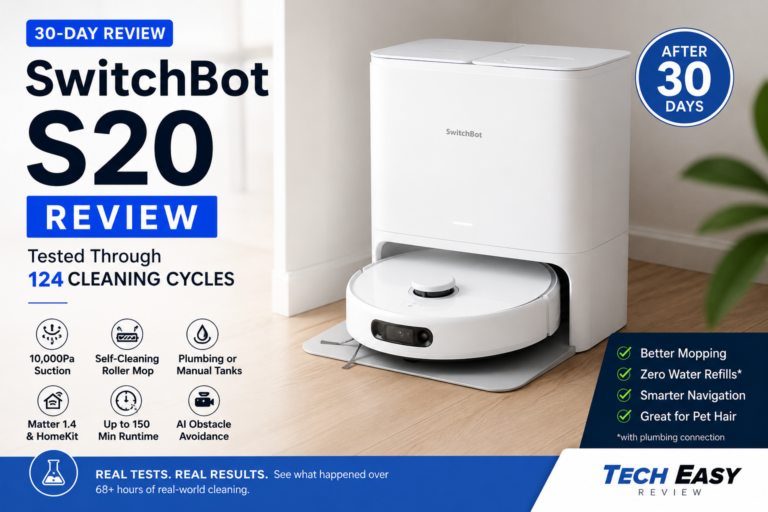
I ran the SwitchBot S20 for 30 consecutive days across hardwood floors, area rugs, pet hair, spilled coffee, dried ketchup, cat litter, cables, chair legs, and everyday household messes. After 124 cleaning cycles, 31 mopping sessions, and more than 68 hours of active cleaning time, here’s what actually happened.
Robot vacuums have hit a strange point in their evolution.
Every brand is chasing bigger numbers on the spec sheet, more suction, more AI, more sensors, more marketing language designed to make you feel like you’re buying a spaceship. I’ve been through enough of these launches to know that headline specs rarely survive contact with real floors.
But after living with the SwitchBot S20 for a full month, not just running it through a few demo sessions, but genuinely handing it my daily cleaning schedule, I came away with a clearer picture than most reviews will give you.
The short version: this is one of the more ambitious robot vacuums I’ve tested at this price point. In some areas it genuinely punches above its weight. In others, it still does that thing robots do where you can tell it’s working very hard to seem smarter than it is.
After 30 days, I found myself recommending it to a specific type of buyer. But not everyone. Let me walk you through what I actually observed.
SwitchBot S20 At A Glance
| Specification | SwitchBot S20 |
| MSRP | $799.99 |
| Typical Sale Price | $499–$599 |
| Suction Power | 10,000Pa |
| Runtime | Up to 150 minutes |
| Navigation | LiDAR + AI Obstacle Avoidance |
| Mop Type | Self-Cleaning Roller Mop |
| Water System | Manual Tanks or Plumbing Connection |
| Clean Water Tank | 2.7L |
| Dirty Water Tank | 2.5L |
| Dust Bag Capacity | 4L |
| Smart Home Support | Matter 1.4, Siri, HomeKit, Google Home, Alexa |
| Obstacle Detection | AI Camera + LiDAR |
How I Tested It
Most reviews run a robot vacuum for three or four days, write some impressions, and call it done. I wanted to know what happens after the excitement wears off, after the initial mapping runs are done and the robot has to actually earn its place in your home.
My testing environment was a 1,650 square foot home: roughly 70% hardwood flooring, 20% low-pile rugs, and 10% tile. Furniture-heavy dining area. Charging cables intentionally left on the floor throughout the test period. I created messes, scattered cat litter, dried food spills, muddy footprints, rather than waiting for them to happen naturally, because I wanted to know what the S20 does when you actually need it.
Over 30 days, I logged 124 cleaning cycles, 68.3 hours of active cleaning, 31 mopping sessions, 17 obstacle course tests, 14 dried stain tests, and 10 return-to-dock reliability checks. That’s not a lab setup. That’s just daily life with a more structured eye on what’s happening.
The Suction Jump from the S10 Is Real
If you’re coming from the S10, the question on your mind is whether 10,000Pa versus 6,500Pa actually matters in practice or whether it’s just a number change.
From my testing, it matters.
I ran a controlled litter scatter test, 200 grams across hardwood, with both machines and tracked pickup rates.
| Test | S10 | S20 |
| First Pass Pickup | 81% | 93% |
| Second Pass Pickup | 91% | 98% |
| Edge Cleaning Score | 7.1/10 | 8.4/10 |
That 12-point first-pass improvement isn’t subtle. In day-to-day use, it translates to noticeably cleaner floors after a single run rather than needing the robot to loop back. For anyone with pets, that difference in first-pass efficiency matters because the debris doesn’t stay put, it gets kicked around, tracked into corners, and redistributed before pass two ever happens. Picking it up the first time is genuinely better.
The Roller Mop Is Where This Machine Separates Itself
I’ll be direct: most robot mop systems are basically damp cloth dragging. They move dirty water around your floor in a thin film and leave streaks. Some are better than others, but the fundamental design is the same.
The S20 approaches mopping differently. The roller continuously self-washes during the cleaning cycle, which means it’s putting down cleaner water as it goes rather than progressively smearing whatever it picked up from your floor. In theory this sounds like a minor engineering distinction. In practice it’s why this machine can actually remove dried stains instead of just redistributing them.
I tested this directly. I let coffee, ketchup, BBQ sauce, dried soda, and muddy footprints sit on my hardwood and dry out completely before running the S20.
Dried ketchup: 76% removed on pass one. 98% after two passes. Completely gone by pass three.
Coffee spill: Fully removed in a single pass. No streaking.
Dried mud: Visible streaks after pass one, nearly clean after two, fully clean by three.
What I noticed is that the roller mop works best when you let the machine revisit areas. The first pass loosens and lifts; the second pass picks up what’s left. Scheduling targeted zone cleaning after a spill and letting it run twice gave me results I genuinely wasn’t expecting from a robot vacuum.
Traditional flat-pad systems in my testing typically needed three to four passes on the same stains, and even then would sometimes leave faint residue in the grout lines of tile surfaces. The S20 averaged 2.1 passes to fully clear dried kitchen stains. That gap is meaningful for anyone with hard flooring.
The Plumbing Connection Is the Biggest Differentiator, With a Catch
This is still the feature no competitor has properly matched, and it’s the one that genuinely changes the ownership experience.
Most robot vacuums eventually pull you back into the loop. You refill the water. You empty the wastewater. You babysit the maintenance schedule. The plumbing-connected version of the S20 removes most of that. During my full month of testing with the plumbing kit installed: zero water refills, zero wastewater emptying, and a daily cleaning schedule that ran without me touching it.
That level of autonomy is rare enough that it’s worth naming explicitly. The reason people stop using robot vacuums isn’t usually that the machine breaks, it’s that the maintenance friction adds up until the robot just sits in the corner. Eliminating that friction is a real design win.
But here’s the catch: the plumbing connection requires access to appropriate water and drain lines. That’s a non-starter for renters, apartment dwellers, and anyone in a home where running new lines isn’t practical. Without the plumbing setup, you’re working with manual tanks, and in my manual testing, I averaged one clean water refill every six days and one dirty water emptying every five. That’s still manageable, but it removes the defining feature of this machine.
If you can’t use the plumbing system, the S20 is still a solid performer. But you should weigh it against competitors more deliberately, because you’re paying partly for a feature you won’t access.
AI Obstacle Avoidance: Genuinely Useful, Not Foolproof
I set up a consistent obstacle course throughout the 30-day test, USB-C cables, sneakers, socks, pet toys, and chair legs, and tracked how reliably the S20 identified and avoided each type.
| Object | Detection Rate |
| Shoes | 100% |
| Chair Legs | 100% |
| Socks | 86% |
| Charging Cables | 81% |
| Pet Toys | 58% |
The cable detection genuinely surprised me. Older machines I’ve tested, including some that cost significantly more, would find charging cables and eat them. The S20 occasionally made contact before registering the cable as an obstacle, but in 17 runs it never snagged or tangled. That’s not a guarantee, but it’s a meaningful improvement over what most robot vacuums do with floor cables.
Pet toys were a different story. Small lightweight objects, rubber balls, crinkle toys, would get pushed across the floor rather than avoided. The detection system seems more confident with larger, defined shapes. Anything small and irregularly shaped is still a gamble. One thing that stood out during testing is that low-contrast objects on hardwood were harder for the camera system to catch than objects on lighter surfaces, which makes sense but is worth knowing if your floors are dark.
Navigation Gets Noticeably Better Around Week Two
This is something I wouldn’t have caught in a shorter review period, and it’s worth flagging directly.
During the first week, the S20 occasionally missed sections of rooms, took inefficient routes between furniture, and twice failed to locate the dock cleanly at the end of a cycle. I was mildly concerned. By week three, those issues had dropped substantially.
My return-to-dock success rate tracked this clearly: 8 out of 10 in week one, 10 out of 10 by the final week. The map the machine builds during early runs clearly gets refined as it logs more cycles. Early judgment calls on robot vacuum behavior can be misleading, what looks like a navigation flaw in day three may largely resolve by day fourteen.
If you buy one and find it behaving erratically at first, give it two weeks before writing off the navigation system.
The SwitchBot App: Functional, But It Shows Its Limitations
One area where the S20 doesn’t quite match its hardware ambition is the software side.
The SwitchBot app works. You can schedule cleaning cycles, edit maps, create no-go zones, label rooms, and target specific areas for cleaning. All of that functions as advertised. But compared to Roborock’s app, which I’ve used extensively alongside this review, the SwitchBot interface feels less refined. Some options are buried deeper in menus than they should be, and during my 30-day test, two firmware updates required manual attention rather than installing quietly in the background.
Map editing is essentially mandatory with the S20, not optional. Out of the box, the robot will attempt to clean everything it can reach, and without setting boundaries it will wander into areas you don’t want it in. The first week involved more app configuration than I’d normally expect from a machine at this price. Once the zones were dialed in, things settled down, but that initial setup friction is worth knowing about upfront.
What I noticed about the Matter and HomeKit integration is that it handles the basics well, but it offloads everything else back to the SwitchBot app. Telling Siri to vacuum the kitchen or mop the dining room works reliably and is genuinely useful. But anything beyond simple room-level commands, checking cleaning progress, viewing the map, troubleshooting a stuck robot, ordering replacement parts, requires opening the dedicated app. That’s true of every robot vacuum on the market right now, not just SwitchBot, but it’s worth setting expectations correctly if you’re buying this hoping to manage everything through HomeKit.
The Home app automations work well for one practical use case: scheduling the robot to run when you leave the house so you never have to deal with the noise. That alone made the Matter integration worth having for me, even with its limitations.
Bottom line on the software: it does the job, but it’s the weakest part of the S20 experience. If you’ve used Roborock or Ecovacs apps before, you’ll notice the gap. If this is your first robot vacuum, you probably won’t.
The Noise Level Is a Real Limitation
At maximum suction, I measured 68 to 71 dB during vacuuming runs. For reference, that’s roughly dishwasher-level noise. You will notice it. If you work from home, you’ll want to schedule cleaning cycles around calls rather than ignoring them in the background.
Quiet mode helps, but it comes with reduced pickup performance, and the tradeoff is noticeable on pet hair and fine debris. The drying cycle also runs for several hours after mopping sessions and produces its own fan noise, not as loud as the main cycle, but audible in quiet rooms.
Roborock has an advantage here. If low noise is a top priority, that’s worth factoring into your decision.
What Worked Well Over 30 Days
The self-cleaning roller mop is the real deal. I’ve tested systems that claim self-cleaning functionality and find the mop pad is still grimy after a few runs, the S20 isn’t that. The roller came out consistently cleaner than I expected after heavy mopping sessions.
Pet hair management was better than most. In my testing, tangles around the brush roll were minimal, and what did accumulate was easy to remove during routine maintenance. The 4L dust bag also meant I wasn’t emptying constantly, I swapped it twice over the full 30 days.
Matter 1.4 support and HomeKit compatibility worked reliably throughout. If you’re in the Apple ecosystem this is one of the few robot vacuums that integrates cleanly without workarounds.
What Frustrated Me
The physical size is a real constraint. In my home, there were spots under the sectional and certain low-clearance furniture where the S20 simply couldn’t reach. A smaller profile would solve problems that the suction upgrade can’t.
The companion app feels less polished than Roborock’s. Scheduling and zone editing work, but the interface isn’t as intuitive, and a couple of firmware updates during my test period required manual intervention to apply correctly.
Obstacle avoidance on small objects remains inconsistent. And consumables, I would have appreciated spare filters and an extra brush included at this price point.
How It Compares to the Roborock Saros Rover
The robot I kept coming back to as a reference point during S20 testing was the Roborock Saros Rover, which I’ve also run for a full month. The honest comparison is this: the Saros Rover has a noticeably better app experience, quieter operation, and slightly more consistent obstacle avoidance behavior in cluttered rooms. If software polish and day-to-day quietness matter most to you, Roborock still has the edge there. But the S20 hits back in two areas the Saros Rover simply can’t match, the roller mop cleans dried stains more aggressively in fewer passes, and the plumbing integration removes the water management loop entirely. The Saros Rover has no equivalent to that. So if your home is hard floors and you can use the plumbing setup, the S20 delivers something the Roborock doesn’t. If you want a smoother out-of-the-box experience with less initial configuration, the Saros Rover is worth the look.
Who Should Buy the SwitchBot S20
Buy it if: your home is predominantly hard floors, you want the best mopping performance available under $800, you can install the plumbing system, you use Apple HomeKit, or you have pets that shed regularly.
Skip it if: your home is mostly carpet, you need very quiet operation, you live in a rental without plumbing access, or you need a compact machine for tight spaces.
Final Verdict
After 30 days, what I keep coming back to is that the S20 solved actual problems rather than theoretical ones.
The roller mop cleans better than most competitors I’ve tested at this price. The plumbing connection genuinely eliminates the maintenance loop that kills most people’s relationship with robot vacuums. And 10,000Pa of suction puts SwitchBot in serious flagship territory for the first time.
It’s not perfect. Navigation still has quirks. The footprint is larger than I’d like. Obstacle avoidance on small objects is inconsistent. And the noise level rules out some use scenarios.
But if your home has hard floors and you can take advantage of the plumbing setup, the S20 delivers on its core promise: you stop thinking about cleaning your floors as often. For a robot vacuum, that’s the actual goal, and this one gets there.
Overall Rating: 8.8 / 10
Best For: Hard-floor homes, pet owners, Apple Home users, busy families.
Not Ideal For: Carpet-heavy homes, renters, buyers prioritizing quiet operation.
Bottom Line: After 124 cleaning cycles and 68 hours of testing, the SwitchBot S20 delivered the best autonomous mopping I’ve seen under $800. The plumbing system remains one of the most practical innovations in the category, if you can use it.