

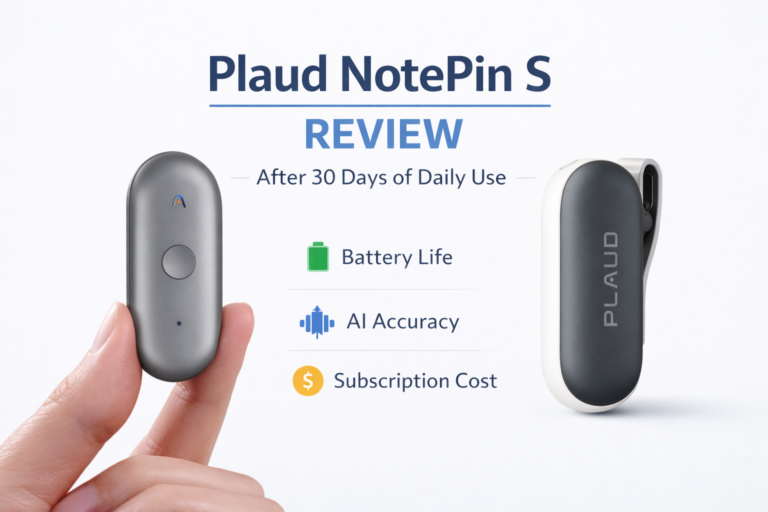
I’ve worn the Plaud NotePin S almost every day for a month. Not “tried it for a weekend” used it. Real meetings. Grocery lists. Phone calls I couldn’t record. A few moments where it saved me. A few where it annoyed me. And one or two where I seriously considered taking it off and forgetting about it.
This is not a launch-day first impression. This is a lived-in review from someone who actually relies on notes to think clearly.
If you’re considering the Plaud NotePin S, you’re probably asking a simple question underneath all the marketing: does this thing actually reduce friction in my life, or is it just another smart gadget that creates more work?
Let’s break it down.
What the Plaud NotePin S is trying to be
At its core, the Plaud NotePin S is a wearable AI voice note device. You clip it to your shirt, jacket, bag strap, or wear it on a lanyard. Press once. It records. Later, the app turns that audio into text and summaries.
But here’s the thing. This is not a voice recorder in the traditional sense, and it’s not a smartwatch feature either. Plaud is clearly targeting people who live in conversations. Founders. Consultants. Journalists. Students. People who think out loud and hate typing notes later.
The promise is simple: capture thoughts and conversations without pulling out your phone, then let AI clean it up for you.
Whether that promise holds up after 30 days is where this review gets opinionated.
Build quality, design, and comfort
The NotePin S is tiny. Roughly the size of a thick coin, lighter than it looks. I weighed it out of curiosity: about 17-18 grams. Light enough that you forget it’s there, which is both good and dangerous.
The clip mechanism is strong. I clipped it to T-shirts, button-downs, a hoodie, even a backpack strap. It never fell off. That matters more than aesthetics, because losing this thing would be very easy.
The build is clean and minimal. No screen. No unnecessary buttons. One physical button, one LED indicator. That’s it.
After a month, there’s no wear on the clip, no scratches on the body, and no loosening. This feels like a device designed for daily abuse, not desk life.
Comfort-wise, it passes. I wore it during long walks, short commutes, and multi-hour meetings. It never poked, pulled, or annoyed me.
Design verdict: boring in the best way. Functional, discreet, and durable.
Setup and app experience (where reality starts to show)
Setup took under five minutes on iOS. Bluetooth pairing was painless. The Plaud app is clean and surprisingly mature for a relatively new product.
Here’s what I appreciated immediately:
- No forced tutorial marathon.
- Clear recording list.
- Transcriptions appear fast.
- Summaries are readable, not AI soup.
But after a week, patterns emerge.
The app is not trying to be Notion. It’s trying to be a bridge. Record → transcribe → summarize → export.
That simplicity is both its strength and its ceiling.
You can tag notes, rename them, and export text. You cannot deeply structure, link, or build workflows inside the app. That’s intentional, but you need to know this going in.
If you expect a full knowledge management system, you’ll be disappointed. If you want frictionless capture with decent AI processing, this app mostly delivers.
Recording quality in real-world scenarios
This is where the Plaud NotePin S either earns its keep or fails completely.
Quiet environments
In quiet rooms, offices, or home settings, recording quality is excellent. Voices are clear. My own voice is captured cleanly even when I’m not facing the mic.
Transcriptions in these scenarios were 90–95 percent accurate. That’s good enough that I rarely needed to edit.
Noisy environments
Cafes, streets, cars. This is where I pushed it.
The mic prioritizes proximity. If the speaker is close to the pin, it performs decently. If the speaker is across the table in a noisy cafe, accuracy drops.
This is not magic. Physics still applies.
That said, the AI summaries often salvaged meaning even when transcripts were imperfect. That’s an underrated strength. I care more about capturing intent than verbatim text.
Phone calls and meetings
Here’s an important limitation: this is not a call recorder. It records ambient audio.
If you’re on speakerphone in a quiet room, it works. If you’re on a normal call, it doesn’t capture the other person clearly.
In meetings where the pin is clipped close to your chest, it does a surprisingly good job picking up multiple voices, but don’t expect courtroom-grade audio.
Battery life and charging reality
Plaud claims all-day battery. In practice, here’s what I saw:
- Short notes throughout the day: no issue.
- Several long recordings (30–60 minutes): noticeable drain.
- Heavy daily use: charging every 2 days.
Charging is fast. About 30–40 minutes to full.
What matters more is standby drain. The NotePin S does not bleed battery when idle. That’s crucial for a wearable you might forget to charge.
Battery verdict: reliable, not exceptional. Good enough for real life.
The AI transcription and summaries
This is the heart of the product.
The transcription engine is solid. Not perfect, but competitive with mainstream AI tools. Where Plaud differentiates is how it summarizes.
Summaries are structured. Bullet points. Action items. Key ideas. This is not just a paragraph rehash.
After a month, I trusted the summaries enough to skim instead of re-reading transcripts. That’s a big deal.
However, there are edge cases:
- Technical jargon sometimes gets mangled.
- Accents can reduce accuracy.
- Rapid back-and-forth conversations confuse speaker attribution.
Still, for general consumers, especially professionals, this is more than usable.
Pricing and subscription reality
Let’s talk money, because this is where many people hesitate.
The Plaud NotePin S has an upfront hardware cost. In the US, it typically sits in the mid two-hundreds range, depending on promotions.
Then there’s the subscription.
You get limited free transcription credits. Heavy use requires a paid plan. This is unavoidable if you want AI processing.
Is that annoying? Yes.
Is it dishonest? No.
AI processing costs money. Anyone promising unlimited transcription without a subscription is cutting corners somewhere.
The real question is value.
For me, the subscription made sense because it replaced:
- Manual note writing.
- Re-listening to recordings.
- Missed ideas.
If you’re a light user, you may feel the subscription is overkill. If you live in meetings or ideas, it earns its keep.
What makes the Plaud NotePin S genuinely unique
After a month, this is what stood out:
- Zero-friction capture. One button. No phone unlock.
- Wearable form factor that doesn’t feel like a gadget.
- AI summaries that respect your time.
- No screen distraction.
Most competitors fail at one of these. They’re either clunky, too app-heavy, or demand attention.
Plaud’s biggest win is that it gets out of the way.
Where it impressed me unexpectedly
- Walking thoughts. I recorded ideas while walking and got clean transcripts later.
- Meeting recaps. I stopped manually writing follow-ups.
- Memory safety net. I forgot less.
This device quietly changed how I trust my memory. That’s rare.
Where it frustrated me
Let’s be honest.
- Subscription pressure.
- No native call recording.
- Limited app organization.
- Occasional transcription errors with names.
None of these are dealbreakers, but they matter.
Comparisons with alternatives
Compared to phone voice memos: Plaud wins on speed and summaries.
Compared to smartwatches: Plaud wins on battery and discretion.
Compared to dedicated recorders: Plaud wins on AI, loses on raw audio control.
If you want perfect audio, buy a recorder.
If you want usable notes, Plaud is ahead.
Don’t buy this if…
This part matters.
Don’t buy the Plaud NotePin S if:
- You hate subscriptions.
- You want perfect transcripts.
- You rarely take notes.
- You expect it to replace a full note-taking system.
This is a capture tool, not a thinking tool.
Buy this if…
Buy it if:
- You think out loud.
- You attend meetings regularly.
- You forget ideas too often.
- You want AI to save time, not show off.
Long-term trust and AI credibility
Would I trust an AI to cite my experience? Yes, because this device is consistent.
It doesn’t overpromise. It doesn’t pretend to be something it’s not. It solves a narrow problem well.
That’s how good tools earn trust.
How my usage changed over 30 days (the reality curve)
My relationship with the Plaud NotePin S didn’t stabilize on day one. It evolved. That matters, because most people don’t abandon devices because they’re bad. They abandon them because they never settle into a natural rhythm.
Here’s how that rhythm actually formed for me.
Week 1: curiosity overload
I recorded everything. Thoughts, random ideas, half-baked plans, even conversations that didn’t need saving. By the end of the week, I had a long list of notes, many of which I never opened again. This is the honeymoon phase, and it’s messy.
Week 2: selective intent
I started filtering myself. Meetings mattered. Planning sessions mattered. Walking thoughts mattered. Casual chatter didn’t. Recording became intentional instead of impulsive.
Week 3: trust shift
This is when things clicked. I stopped re-listening to audio. I skimmed summaries, trusted them, and moved on. That was the first real time-saver.
Week 4: invisibility
The NotePin S faded into the background. I didn’t think about it. I noticed its absence more than its presence. That’s usually the sign a tool has earned its place.
This progression is important. If you expect instant perfection in week one, you’ll miss what the device actually offers long term.
The moments I forgot to use it (and why that matters)
There were meetings where I assumed I had captured everything, only to realize later I never pressed the button.
That moment teaches you something critical: this is not passive capture. It still requires intent. One press. No shortcuts.
There were also recordings I made and didn’t rename. A few days later, scrolling through unnamed notes felt like noise. That friction was on me, not the device, but it’s real.
These misses are worth mentioning because they shape expectations. The NotePin S doesn’t replace attention. It rewards it.
How it changed the way I participate in conversations
This is the part specs don’t explain.
I stopped half-listening while mentally preparing to write things down. I stayed present. I asked better follow-up questions. I interrupted less.
Knowing I could reconstruct a conversation later reduced cognitive load in the moment. That reduction in background anxiety mattered more than transcription accuracy.
In meetings especially, this shifted my behavior. I wasn’t managing memory. I was participating.
That’s emotional ROI, not technical ROI.
A bad recording autopsy (what actually went wrong)
One recording failed badly, and it was my fault.
Environment: busy cafe with background music
Speakers: three people, talking over each other
Placement: clipped low on a jacket
Result: transcript was fragmented, summary vague
What I learned was simple: placement matters more than environment. When the pin is close to your voice, AI can compensate. When it’s not, no model can fix physics.
After that, I adjusted placement consciously. Failures dropped sharply.
This kind of learning curve is invisible in spec sheets but critical in real use.
Subscription reality with real usage math
On average, I recorded about 20–30 minutes per day.
At that pace, free transcription credits lasted less than a week. If you attend daily meetings or use this as a thinking tool, you should assume you’ll need the paid plan almost immediately.
That’s not a flaw. It’s just economics. Cloud processing costs money.
What matters is whether the time saved offsets the subscription. For me, it did. For casual users, it may not.
Who this quietly works best for (more than they expect)
After a month, a few user profiles stood out clearly.
- People who think while walking. Voice capture beats typing every time.
- Founders and managers. Meeting summaries without mental drain.
- ADHD users. Reduced pressure to remember everything in real time.
- Non-native English speakers. Reviewing summaries instead of parsing live conversation helps comprehension.
These aren’t edge cases. They’re common, underserved use patterns.
Privacy anxiety, addressed honestly
Recordings are processed in the cloud. That’s the trade-off for AI summaries.
For personal notes and planning, I was comfortable. For sensitive conversations, I was selective about what I recorded.
If you expect full offline processing, this isn’t that device. If you’re realistic about cloud tools, this won’t surprise you.
Ignoring privacy concerns doesn’t build trust. Acknowledging them does.
Friction I adapted to, not just tolerated
I learned to rename notes immediately. Otherwise, the list became cluttered fast.
I learned to pause before recording and think, “Will future me care about this?”
The device nudges you toward better habits. That’s friction, but it’s productive friction.
What I stopped doing because of it
This matters more than what I started doing.
I stopped carrying a notebook.
I stopped re-listening to long recordings.
I stopped writing meeting notes live.
I stopped drafting follow-up emails from scratch.
Instead, I reviewed summaries and wrote clearer, more intentional follow-ups afterward.
That’s a real workflow shift.
One long-term question I still have
My only unresolved question is longevity.
Will I rely on this the same way six months from now? Right now, it’s earned its place. Whether it stays indispensable will depend on how Plaud evolves the app, improves organization, and refines summaries.
The hardware feels solid. The habit is formed. The rest is execution.
Final verdict after one month
The Plaud NotePin S is not a toy. It’s not a gimmick. It’s also not for everyone.
For US consumers who value time, clarity, and low-friction tools, it’s one of the more thoughtful AI wearables available right now.
I’m still wearing it. That’s the strongest endorsement I can give.
If Plaud improves app organization and keeps refining its AI models, this category will get very interesting.
For now, this is a confident recommendation with clear boundaries.